
Verified publisher
Manual Import

Collaborall
Importeer data met de hand
Gemeenten en andere overheden
Service- en Onderhoudsbedrijven
Netbeheerders
Ingenieurs- en Ontwepbureau’s
Ontwikkel en Bouwbedrijven
omschrijving
Manual Import legt vast waaruit een modulair project bestaat, ook als er geen bruikbaar BIM-model is. Je beschrijft per type welke modules er zijn, uit welke elementen een module bestaat en welke objecten er in een element zitten. Zo ontstaat snel een complete projectdefinitie, die de rest van de productieketen gebruikt: de stuklijst, de productiehal, de stations en de bouwplaats. Het vervangt de Excel-productieplanning waar die gegevens eerder in stonden.
Waarom BIM Viewer · USP'S
Een complete projectdefinitie zonder BIM-model, voor projecten waar het model ontbreekt of de gegevens niet goed zijn opgebouwd.
Een receptmodel van project naar moduletype, element en object, zoals de productie werkelijk is opgebouwd, in plaats van een platte lijst zoals in een productieplanningssysteem als ProduuzIT.
Invoer per type: een moduletype definieer je één keer en het geldt voor alle modules van dat type.
Controle bij het inlezen: fouten en tegenstrijdigheden worden gemeld voordat ze de productie in gaan.
De hele productieketen werkt met wat hier is vastgelegd, van stuklijst tot voortgang op de bouwplaats.
Wat levert het op
Waarom
["Situatie: Modulaire bouwdefinities werden beheerd in losse Excel-bestanden, ERP-systemen of BIM-modellen die niet direct bruikbaar waren voor productieplanning. Elke discipline (constructie, installaties, gevels) onderhield eigen definities. Geen geïntegreerde hiërarchische structuur van project → module → element → materiaal. Wijzigingen in een moduletype moesten handmatig worden doorgevoerd in alle projecten die dat type gebruikten.", "Probleem: - Bouwdefinities verspreid over meerdere systemen en bestanden, geen single source of truthn- Handmatige vertaling van ontwerp naar productie-input, foutgevoelig en tijdrovendn- Wijzigingen in moduletypes niet automatisch doorgevoerd in projecten die dat type gebruikenn- Geen hiërarchische structuur: relatie project → module → element → materiaal niet expliciet vastgelegdn- Downstream apps (BOM, productie) werken met verouderde of inconsistente definitiesn- Template-hergebruik ontbreekt, elk project begint opnieuw met definiëren", "Implicatie: Deze app stelt een bedrijf in staat om projecten zonder BIM model in ANT te laden om andere logica in ANT te kunnen gebruiken. Zo kunnen planningsapps maar ook WKB apps gebruikt worden zodat integraal datagedreven aansturen mogelijk blijft. Veel bedrijven zijn in transitie en nog zoekende in BIM dit zorgt ervoor dat er geen reden is om ANT niet te kunnen gebruiken als er geen juist BIM model aanwezig is. Door ANT te gebruiken worden risico's, faalkosten naar beneden gebracht.", "Need-payoff: - Eén centrale plek voor alle bouwdefinities → eliminatie van inconsistentiesn- Hiërarchisch datamodel (project → module → element → materiaal) → volledige traceerbaarheidn- Template-gebaseerde moduletypes → snelle project-setup en consistentien- Wijzigingen propageren automatisch naar alle downstream apps → altijd actuele datan- Gestructureerde data-invoer → minder fouten dan vrije-tekst spreadsheetsn- Digitale kennisborging → minder afhankelijkheid van individuele medewerkers"]
Functional description
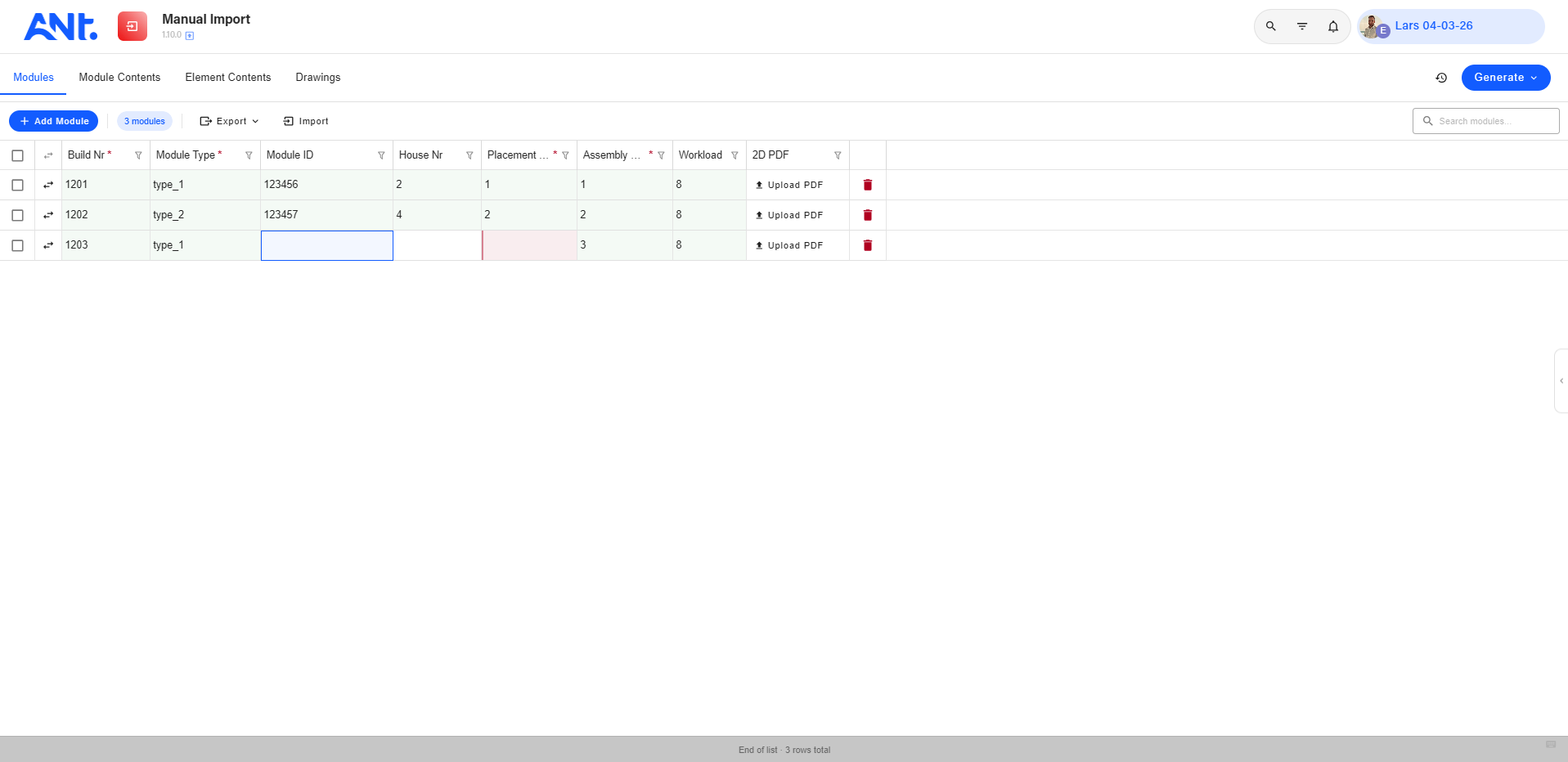
<p>Manual Import is de invoer van de productiedefinitie van een modulair project. Je begint met de modules en hun basisgegevens, legt per module vast welke elementen erin zitten en per element welke objecten. Omdat je per type werkt, bouw je snel een definitie op voor een project met veel gelijke modules. Snelkoppelingen brengen je direct van een module naar zijn elementen en objecten.</p>
<p>Gegevens die al in een vastgesteld Excel-formaat staan, lees je in. Grote bestanden worden in delen verwerkt, en de app controleert de gegevens tegen de opbouw van het project. Fouten en conflicten krijg je als melding terug, zodat je ze oplost voordat de stuklijst en de productieplanning ermee aan de slag gaan.</p>
<p>– Modules invoeren met hun basisgegevens<br />
– Elementen per module en objecten per element vastleggen<br />
– Werken per type voor projecten met gelijke modules<br />
– Inlezen vanuit een vastgesteld Excel-formaat<br />
– Controle en foutmeldingen bij het inlezen</p>
TECHNICAL FEATURES
<p>Frontend: een Vue 3-app in TypeScript met Vuetify 4 en UnoCSS. De tabelweergave is zelf gebouwd en laadt alleen de zichtbare regels, zodat ook grote projectdefinities vlot blijven.</p>
<p>Backend: de app heeft geen eigen server. De projectdefinitie staat in dertien ANT-tabellen op projectniveau, van modules en elementen tot objecten en afmetingen, beheerd door het ANT OS-platform. Tekeningen gaan via het documentbeheer van het platform, en objecten sluiten aan op de SBS-structuur.</p>
<p>API: de app communiceert met het platform via de ANT API met @antcde/connect-ts.</p>
ANT Primitieven
BIM
Dynamic Tables
Data requirements
# Manual Import **The data authoring environment for defining modular building structures in DHME projects.** Manual Import is the foundational app in the DHME (Digitale Huis Maak Ervaring) suite. It is where project teams define and maintain the complete recipe of a modular building: which modules make up a project, what elements each module type contains, and which objects/materials each element requires. The output of this app drives all downstream apps — including the Bill of Material. --- ## What it does Manual Import manages four interconnected datasets: | Dataset | What it defines | |---|---| | **Modules** | The physical building units in a project (build number, module type, house number, phase, sequence, 2D drawing) | | **Module Contents** | Which elements go into each module type, organized by element position | | **Element Contents** | Which objects (materials/components) each element type requires, and in what quantity | | **Drawings** | Project drawing documents (title + file upload) | Once the data is complete and validated, a **generation** transforms these definitions into concrete element and object records that other apps can consume. --- ## Tabs ### Modules Manage the list of physical modules in the project. Each module has a build number, module type, house number, phase, and an assembly sequence. Modules can have 2D drawings attached. The module type is the key linking a module to its element definitions. ### Module Contents Define which elements go into each module type, organized by element position. Columns are grouped into categories that can be renamed, reordered, and toggled for visibility. This tab drives what the generated elements look like. ### Element Contents Define which objects (materials, components) each element type requires, and in what quantity. Also includes the object register — a catalog of all known objects with their dimensions, steel quality, and NLSFB classification. This tab is hidden automatically in **BIM mode** (see below). ### Drawings Upload and manage project drawing documents. Each drawing has a title and a file attachment. --- ## Key features ### Generation system The core action in Manual Import. After defining modules, module contents, and element contents, the user triggers a **generation** that transforms the definitions into concrete element and object records. - **Normal generation** — generates new records from current definitions, adding or updating as needed - **Force generation** — purges all existing generated records and rebuilds from scratch; useful when structural changes have been made - Generation progress is tracked in real time via WebSocket signals - Full generation history is stored and viewable (status, timestamps, errors) ### BIM mode When any module in the project has a non-empty `model` field (a BIM reference), the app automatically enters BIM mode. In this mode: - The Module Contents and Element Contents tabs are hidden - Only Modules and Drawings are shown - This accommodates projects where element/object definitions come from a BIM model rather than being entered manually ### Three-level locking system Records can be locked at three levels to prevent concurrent editing conflicts: - **Row lock** — locks all cells for a given module type - **Column lock** — locks all cells for a given element position - **Cell lock** — locks a specific module type + element position combination Locks are visualized directly in the table. Locked cells are indicated and cannot be edited until unlocked. ### Custom virtual-scrolling DataTable All data is presented in a fully custom-built table component with: - **Inline cell editing** with validation and optimistic UI updates (cell updates immediately, API follows, rolls back on error) - **Keyboard navigation** — arrow keys to move between cells, Enter to confirm, Escape to cancel - **Shift-click multi-selection** for bulk row operations - **Right-click context menus** for row and header actions - **Column reordering and resize** with persistence across sessions - **Column-level filtering** with dropdown UI - **Lock visualization** directly in cells and column headers ### Import / export All main tables support JSON import and export: - Module Contents supports category-based export (export only selected categories) - Element Contents supports object-type filtering - Import progress is tracked in real time via WebSocket signals, with per-table progress indicators ### Dynamic Module Contents configuration The Module Contents tab allows full column configuration: - Create and rename **categories** to group related element positions - Set column **labels**, sort order, and visibility - Configuration is persisted in a dedicated database table - If the configuration table is empty and the user has write access, the app auto-seeds a default layout ### Permission-based access Each table has independent read/write permissions. The app respects these per tab: - Users without read access to a table cannot see that tab's data - Users without write access see the table in read-only mode - Project admins bypass all permission checks --- ## Data flow ``` Modules → Module Contents → Element Contents ↓ [Generation] ↓ Elements + Objects tables ↓ Bill of Material app ``` --- ## Supported languages English, Dutch, German --- ## Technical notes - Built with Vue 3, TypeScript, Vuetify 3, Pinia, and UnoCSS - State is managed via a global singleton store pattern (`createGlobalState`) - Real-time updates via WebSocket signals (`jobProgress`, `tableImportProgress`) - All API calls go through `@antcde/connect-ts` (table CRUD) and `@collaborall/dhme-services` (generation API) - The DataTable is a fully custom virtual-scrolling implementation — not a third-party table library
Versie
1.19.0
Manual Import
We laten in 30 minuten zien wat deze app voor jouw projecten betekent.
Bewijs uit de praktijk
Resultaat, geen beloftes
Praktijk
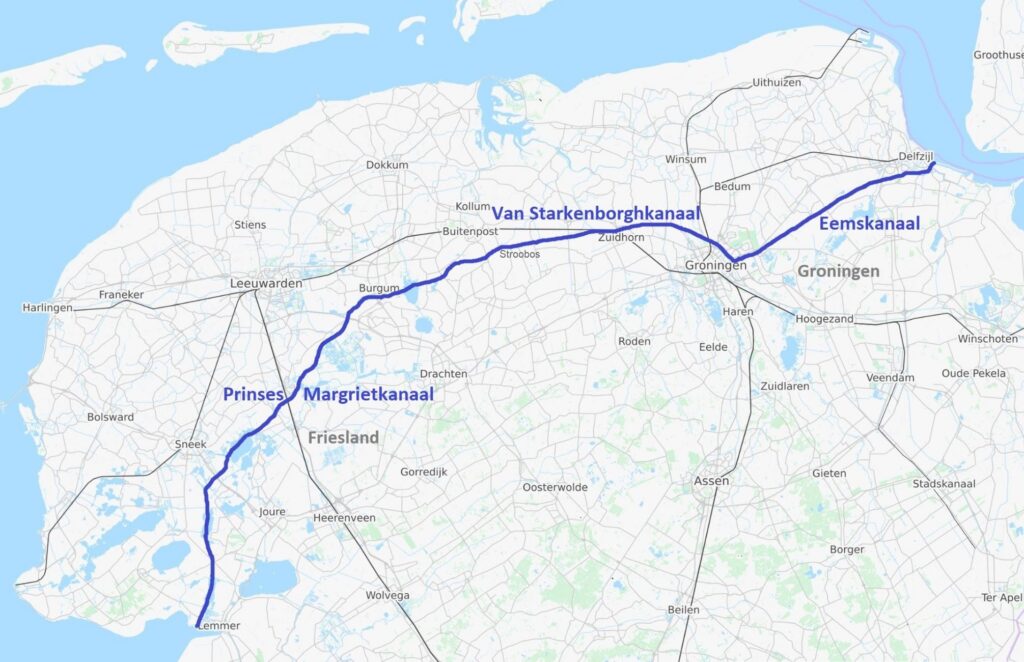
Stromende data bij 118 km renovatie: de Hoofdvaarweg Lemmer–Delfzijl
Van GIS en BIM tot point clouds: alle data kwam samen in één centrale omgeving. Zo werd de renovatie van de Hoofdvaarweg Lemmer–Delfzijl transparanter, efficiënter en beter beheersbaar.

Lees artikel

Praktijk
Future Green City Congres
MONADY bestuurder en CTO van de collaborall Group, Jan Willem Kattouw, was spreker op het FUTURE GREEN CITY CONGRES én de Vakbeurs Openbare Ruimte.
Lees artikel

Praktijk
collaborall Group versterkt directie.
Na 5 jaar te hebben gewerkt bij Daiwa House Modular Europe start Tomas de Swaaf Group als Managing Partner.
Lees artikel